
The Netzknoten Navigator connects geographic positions with German road-network nodes, sections, and stationing, then keeps that location usable throughout the rest of the job. GPS coordinates and map points can become professional road references, while an existing section and station can be resolved back to the map. Sharing, navigation, batch processing, exports, APIs, and MCP extend the workflow beyond a single search.
What does Netzknoten Navigator provide beyond an ordinary map search?
A general mapping application is very good at finding an address or displaying a geographic point.
For traffic control work on classified German roads, that is often only the beginning.
A contractor may need to know which formal road section contains the point, which network nodes define the section, where the position lies within the stationing system, or how an existing road reference translates back into a physical location.
The field crew then needs the same site in another representation again, usually as something that opens directly on a smartphone and can be handed to navigation.
Vextario Netzknoten Navigator connects these requirements.
The product does not treat a road location simply as a marker placed on a map. The same location can be a geographic coordinate, a professional network reference, a navigation target, a shared project result, or structured input for another software system.
That connection between representations is what makes the product particularly relevant to traffic control contractors, road construction companies, supervisors, dispatch teams, and field crews.
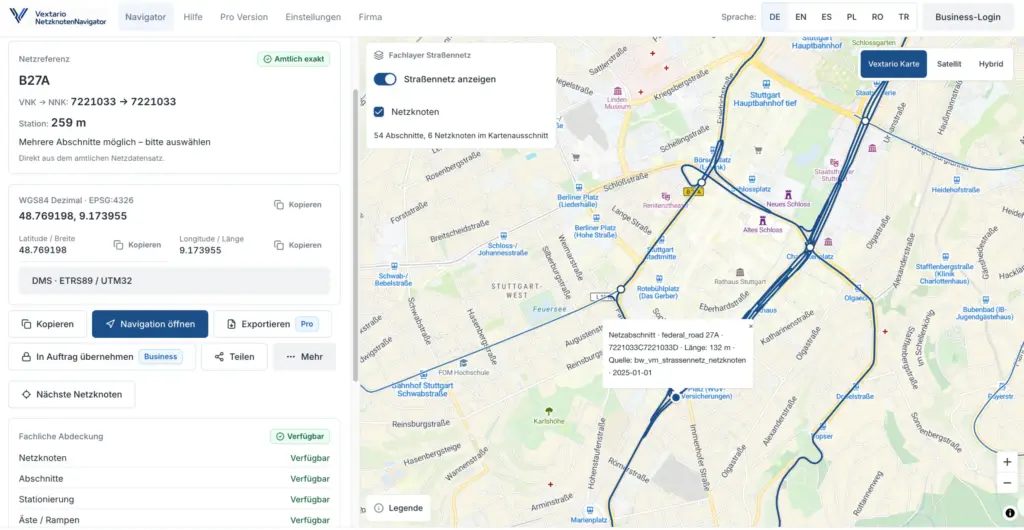
Product page: Vextario Netzknoten Navigator
https://netzknoten-navigator.vextario.com/
How does a GPS position become a professional road reference?
The most straightforward workflow begins with a location that is already known geographically.
A supervisor may be standing at the future work zone. A customer may have supplied coordinates. An estimator may select the site directly on the map while preparing a quotation.
Netzknoten Navigator can translate that geographic point into the available professional road context.
Depending on the regional source data, the result can include the road, network nodes, road section, stationing, and additional network attributes.
That changes the usefulness of the location.
Instead of retaining only a latitude and longitude, the contractor can connect the point with the formal road model used in road information systems.
For an occasional consumer-map lookup, that distinction may not matter much. For a traffic control order, inspection record, project handoff, or structured customer data set, the road reference can be substantially more useful than an isolated coordinate.
The employee can continue working with the location without first reconstructing the road context manually.
How does the reverse road-reference workflow work?
Many traffic control jobs begin in exactly the opposite direction.
The customer or road authority already provides a formal road reference. The document may identify the road, section, network node, or stationing, but the project team still needs to know where that location actually sits on the map.
Netzknoten Navigator therefore supports bidirectional road referencing.
Where the regional data supports the operation, an existing section and station can be converted back into a geographic location.
That position can then be inspected visually, shared with another employee, or transferred to a navigation application.
The reverse workflow matters because professional road references and field navigation serve different purposes.
A stationing reference may be ideal for a specification, authority document, or project record. A crew leader preparing to drive to the site needs a geographic destination.
The product keeps both representations connected to the same underlying road location instead of requiring employees to choose one and discard the other.
What information can belong to a professional road position?
A complex road location can contain more information than a road name and a kilometer value.
Network nodes form important reference points within the German road model. Road sections connect those nodes or related zero points. Stationing describes a position along the section. Branches, ramps, separated carriageways, stationing direction, and travel direction may add further context.
This becomes operationally important around interchanges.
A geographic marker can sit very close to both a main carriageway and a ramp. A simple nearest-road calculation does not necessarily identify the professional reference required for the project.
Netzknoten Navigator is designed to evaluate the available network context rather than reducing every location to whichever road geometry happens to be closest.
When more than one assignment remains technically plausible, the system can preserve that ambiguity for professional review.
The employee therefore receives more than a convenient answer. The result can include the information required to determine whether that answer actually fits the job.
How do map, satellite, and hybrid views support project preparation?
The map is an active part of the workflow rather than a decorative background.
The standard map view supports road context, places, and general orientation. Satellite imagery helps when the physical environment around the site needs to be reviewed. A hybrid view combines aerial imagery with additional geographic information.
That can be useful when a work zone is near an interchange, bridge, access road, parking area, or another feature that affects field operations.
Professional road data and imagery serve different purposes.
Aerial imagery helps an employee understand the physical layout. The network reference describes how the location belongs to the professional road model.
A single German state can already contain a substantial operational road network. Hessen Mobil manages approximately 15,200 kilometers of federal, state, and district roads when its published road categories are combined.
Those roads include very different environments, from urban sections to rural roads and complex junctions. Netzknoten Navigator therefore combines map context with network context instead of expecting one representation to replace the other.
Which coordinate formats are available from the same result?
A road location rarely remains in one coordinate representation throughout an entire project.
A phone typically provides WGS84 latitude and longitude in decimal form. Another document may use degrees, minutes, and seconds. GIS and engineering workflows in Germany often use ETRS89/UTM Zone 32.
Netzknoten Navigator keeps these representations connected to the same resolved location.
The application can provide WGS84 decimal coordinates, WGS84 degrees-minutes-seconds, and ETRS89/UTM Zone 32 based on EPSG:25832.
The important feature is not merely the mathematical conversion.
The user does not have to search for the location again.
An employee who already has the correct work site can switch to the representation required by a GIS workflow, project document, customer system, or field application without moving the coordinate through another standalone conversion website.
That removes a small but frequent piece of manual work from the process.
How can users find Netzknoten and road sections directly on the map?
Not every task starts with complete input information.
Sometimes the road is known but the relevant section is not. A project may mention a network node without showing the surrounding road geometry. In another case, a supervisor may know the approximate work area but still need the professional section and stationing.
Netzknoten Navigator can display available network nodes and road-network information directly within the map context.
A user can select a map point, inspect nearby nodes, and review the course of the relevant road section. The network node therefore becomes part of a geographic relationship rather than an isolated number in a table.
This is especially useful around complex junctions.
Several nodes or branches may lie close together, but only one road relationship may fit the actual project.
Being able to inspect the network geometry and the physical site together reduces the amount of mental translation required between separate road portals and mapping applications.
Why is road-structure search part of the product?
Bridges and other road structures regularly appear in traffic control jobs, construction documents, inspections, and authority records.
A customer may identify a site through an official structure number. That identifier can be an excellent professional reference while still being a poor navigation destination for a crew.
Netzknoten Navigator can connect available road-structure information with the road network.
Where suitable source data exists, users can search structures through official identifiers and view their relationship with the road reference. Nearby structures can also provide useful context when the road position is already known.
This brings together information that is often scattered across separate systems: the structure identifier, geographic location, and road-network relationship.
The scale involved can be substantial. Hessen Mobil currently reports 4,955 bridges in its area of responsibility.
For contractors working around road infrastructure, treating the structure and its road location as parts of the same workflow can therefore be considerably more practical than maintaining separate searches.
How does a resolved location reach the next employee?
Digital workflows often lose much of their value at the moment one person hands information to another.
Project preparation finds the correct site. Then somebody takes a screenshot. A coordinate is copied into a message. The supervisor searches for the location again on a phone. The crew leader later enters the destination into a navigation application.
Netzknoten Navigator is designed to shorten that sequence.
A resolved result can be shared through a persistent link.
A QR code provides another handoff method, particularly when a work order is printed or when an employee wants to move the location quickly from a desktop screen to a phone.
The human-readable road reference can also be copied into project documentation, email, a customer record, or another business application.
The operational advantage is not the link or QR code itself.
It is the fact that the recipient starts with the same prepared road location rather than reconstructing it from scratch.
How does a professional network reference become a navigation destination?
Road section and stationing are useful in professional road workflows.
A navigation application needs a geographic destination.
Netzknoten Navigator maintains both.
Once the road reference has been resolved, the corresponding geographic position can be transferred to supported navigation services or to the device’s system navigation.
The crew leader therefore does not need to interpret the stationing manually or convert it into coordinates before departure.
The office retains the professional reference for the project. The vehicle receives the geographic point needed for navigation.
This is particularly useful on rural sections where a postal address is not a meaningful description of the work location.
The product turns the same underlying position into the representation required by each stage of the job.
Which features are designed specifically for field use?
Netzknoten Navigator is not intended to be a desktop-only road-information tool.
The application works across desktop computers, tablets, and smartphones and can be installed as a progressive web app on supported devices.
Mobile use includes GPS positioning, map work, road-reference lookup, sharing, and navigation handoff.
GPS access is useful but not mandatory.
A field employee can still enter coordinates, select a map point, or work from an existing road reference when device location is unavailable or not needed for the task.
Local history can make recently used locations available again without starting another search.
The interface also supports several languages, allowing the same professional road position to be used by multilingual teams without creating separate location records for different interface languages.
Why are source, data vintage, and regional capability visible parts of the product?
A coordinate can look extremely precise while the road-network assignment behind it is still uncertain.
Netzknoten Navigator therefore treats data quality as part of the user-facing workflow rather than hiding it entirely in the backend.
A result can retain information about the source data and its data vintage. Regional capabilities indicate which specialist functions are supported in a particular data environment.
Ambiguous situations can remain visible instead of being collapsed automatically into one apparently convenient answer.
That behavior reflects the way road infrastructure is actually managed.
Hessen Mobil alone operates 46 road maintenance depots. Road networks are maintained, rebuilt, reclassified, and updated continuously.
A nationwide specialist application therefore has to cope with regional data sets that differ in attributes, update cycles, and available functions.
A missing specialist value should remain a data gap rather than being replaced by a number that merely looks plausible.
What happens when a field employee finds a questionable result?
Field staff often encounter infrastructure changes before every downstream data set has been updated.
A direction may look wrong. A section may not match the project documentation. A rebuilt junction may behave differently from the expected network model.
Netzknoten Navigator supports structured data-quality feedback for these cases.
The user can identify which part of the result appears to require review, such as the road, section, stationing, or direction.
The reported issue does not automatically overwrite the underlying source data.
That distinction is important for professional data management.
A mismatch may come from an older source version, a regional data limitation, a special network configuration, an infrastructure change, or the resolution method itself.
Field feedback therefore becomes evidence for investigation rather than an uncontrolled edit to authoritative road information.
How does Netzknoten Navigator compare with a general-purpose map?
| Task | General-purpose map | Vextario Netzknoten Navigator |
|---|---|---|
| Display GPS position | yes | yes |
| Display coordinates | yes | yes |
| Search German Netzknoten | generally no | yes |
| Determine road section and stationing | generally no | yes |
| Resolve stationing back to the map | generally no | yes |
| Provide WGS84, DMS, and ETRS89/UTM32 together | sometimes | yes |
| Show professional section and network context | not the main purpose | yes |
| Connect road structures with network references | usually separate | integrated where data exists |
| Preserve ambiguous road matches | not a specialist function | yes |
| Retain source and data-vintage context | usually limited | yes |
| Share professional location through QR code | sometimes | yes |
| Process many locations in one job | generally no | CSV batch |
| Export for GIS | limited | GeoJSON |
| Integrate specialist road logic | general map API | Road Network Intelligence API |
| Expose road functions to assistants | no specialist Netzknoten layer | MCP |
Netzknoten Navigator therefore does not need to become a better general map than products built for worldwide consumer navigation.
Its role is different.
The product adds professional German road referencing and keeps that information available for the tasks that follow the map lookup.
How does individual lookup become a larger data workflow?
Interactive search is appropriate when an employee is working with one road location.
The economics change when a framework contract, inspection program, customer spreadsheet, or historic project data set contains many positions.
Professional Netzknoten Navigator workflows therefore include CSV batch processing.
A list of geographic coordinates can be resolved into professional road references in bulk. The reverse transformation can also convert existing network references into geographic positions.
Column mapping allows companies to work with input files that were not created specifically for Vextario.
The error model also reflects real operational data.
One invalid or ambiguous row does not have to invalidate an otherwise useful processing job. Exceptions can be separated for review while successfully processed records continue.
At that point, the product is no longer simply a convenient map search. It becomes a reusable road-location processing component.
Which exports are available for downstream systems?
A road-reference result often needs to move into another application.
CSV is useful for spreadsheets, reporting, business intelligence, customer data, and traditional specialist applications.
GeoJSON provides a direct path into many GIS and web-mapping environments.
For suitable professional data environments, an OKSTRA-oriented export workflow can provide another route into German road and transportation data processes.
The export does not have to contain only the geographic point.
Source provenance, data vintage, assignment status, and other contextual information can remain connected to the result where useful.
That context becomes valuable when a record is viewed months later by somebody who was not involved in the original lookup.
A coordinate explains where the point is. Provenance can help explain how that point was connected to the professional road network.
Why does batch processing make sense for road-network data?
Professional road operations naturally produce data sets larger than one map point.
Work-zone lists, inspection points, structures, asset records, traffic information, and project portfolios all create collections of spatial information.
The national road traffic count conducted in 2025 collected data at around 3,000 counting locations on federal, state, and district roads in Hesse alone.
Those traffic counts are not themselves a Netzknoten Navigator feature.
The scale is useful because it illustrates a broader point: professional road data quickly moves beyond individual searches.
Companies that use geographic road information operationally eventually need repeatable ways to process lists, transfer results, and connect systems.
Batch processing and structured export are therefore a natural extension of an interactive road-reference tool rather than an unrelated enterprise feature.
How can existing business software use Netzknoten Navigator functions?
A contractor should not have to move every workflow into one additional web interface.
The company may already operate a dispatch application, customer portal, GIS environment, inspection system, or internal project platform.
The Road Network Intelligence API is designed to make the specialist road-location functions available inside those systems.
Connected applications can resolve geographic positions, translate stationing back into geographic coordinates, retrieve road-network context, or determine which regional capabilities are available.
The API is versioned so integrations can rely on defined contracts.
This means the product can operate at two levels.
Employees can use the web interface directly when that is the most convenient workflow. Other systems can use the underlying specialist functions without requiring the user to repeat the same road search manually in another browser window.
What does MCP add to the integration model?
MCP extends access to the same specialist road functions for compatible assistant-based workflows.
Instead of asking a language model to infer a German road section from general geographic knowledge, the assistant can call dedicated road-network operations.
Those functions can include finding a network node, identifying a road segment, resolving a geographic location, resolving stationing, or retrieving the available network context.
The separation is important.
Natural-language interaction can remain flexible, while the actual professional road calculation stays inside the specialist Road Location engine.
The web application, API, batch processor, and MCP workflow therefore do not need to maintain four independent interpretations of the German road network.
They can use the same professional foundation.
That becomes especially useful when companies later introduce assistant functions into dispatch, project preparation, customer service, or internal operational tools.
Which parts of the product does a mid-sized traffic control company actually need?
Not every company needs APIs, batch processing, or specialist exports on the first day.
A smaller contractor may begin with the functions that solve immediate operational problems: locate the site, determine the road reference, convert stationing, use the correct coordinate format, share the result, and send the crew to the location.
As digital usage grows, the requirements change naturally.
Several employees begin using the same road data. Project spreadsheets need bulk processing. GIS becomes part of the workflow. A dispatch system needs road references without manual entry.
The product can expand into those requirements without forcing the company to replace the basic road-location workflow with an entirely different enterprise system.
That progression is particularly relevant for mid-sized specialist contractors.
They can use a focused operational tool first and introduce deeper system integration only where the business case justifies it.
The broader Vextario product family for traffic control companies covers additional operational workflows:
Which feature ultimately makes Netzknoten Navigator most useful?
The most valuable feature is not necessarily one button or one data field.
It is the way the functions connect.
A map point becomes a professional network reference. The network reference provides stationing. The same location is available as UTM coordinates. A link sends it to the supervisor. A QR code moves it onto a field phone. Navigation takes the crew to the site. Later, a project list is processed in bulk. The result is transferred as GeoJSON to GIS or retrieved through an API by another system.
Another project may start in the opposite direction, with a section and station from a road authority document.
The physical location remains the same while the representation changes to match the task.
That is the product idea behind Netzknoten Navigator.
It turns a road location from an isolated search result into information that can continue through the rest of the operational workflow.
Product page: Vextario Netzknoten Navigator
https://netzknoten-navigator.vextario.com/
Manufacturer: KrambergAI GmbH
https://krambergai.com/
Sources for the statistics used
Hessen Mobil: Hessen Mobil in figures
Statistics used: approximately 15,200 km of federal, state, and district roads, 46 road maintenance depots, and 4,955 bridges.
https://mobil.hessen.de/
Hessen Mobil: Interactive traffic-volume map and 2025 road traffic count
Statistic used: approximately 3,000 counting locations on federal, state, and district roads.
https://mobil.hessen.de/verkehr/interaktive-verkehrsmengenkarte
Further reading
MobiData BW: Road Network and Netzknoten in Baden-Württemberg
Official state data set covering the classified road network, network nodes, and additional road attributes.
https://mobidata-bw.de/dataset/strassennetz-netzknoten-baden-wuerttemberg
Baden-Württemberg Ministry of Transport: Road Information Systems
Official overview of the state’s road information database, geographic analysis environment, and structure database.
https://vm.baden-wuerttemberg.de/de/mobilitaet-verkehr/auto-und-lkw/strasseninfrastruktur/ausschreibungsservice-der-strassenbauverwaltung/strasseninformationssysteme
Brandenburg Geoportal: WFS Classified Road Network
Official download service covering classified roads, network nodes, zero points, stationing, and additional road-network information.
https://geoportal.brandenburg.de/detailansichtdienst/render?url=https%3A%2F%2Fgeoportal.brandenburg.de%2Fgs-json%2Fxml%3Ffileid%3Df1663eae-7802-4856-ba2f-2d0f26891f9a
Can I use Netzknoten Navigator without installing traditional software?
Yes. Netzknoten Navigator runs as a browser-based application on desktop computers, tablets, and smartphones. On supported devices, it can also be installed as a progressive web app. A company can therefore begin with the core search and mapping functions without deploying a traditional desktop software package or starting a larger internal IT implementation project.
Can Netzknoten Navigator determine network nodes and stationing from GPS?
Yes, when suitable regional road data is available. GPS or manually entered coordinates can provide the geographic starting point. Netzknoten Navigator can then resolve the available road context, including the road, network nodes, section, and stationing. Complex interchanges may produce several technically plausible results that require professional review by the user.
Can I turn an existing stationing reference back into a map point?
Yes. The road-reference workflow operates in both directions. A known combination of road, section or network nodes, and station can be translated into a geographic position where the available source data supports that function. The resulting location can then be inspected on the map, shared with another employee, or transferred to supported navigation.
Which coordinate formats does Netzknoten Navigator support?
The application can present the same location as WGS84 decimal coordinates, degrees-minutes-seconds, and ETRS89/UTM Zone 32 using EPSG:25832. This allows smartphones, GIS systems, project documents, and other specialist applications to use the representation they require without forcing the employee to search for the site again in a separate coordinate-conversion tool.
Can I send a result directly to a supervisor or field crew?
Yes. A resolved location can be shared through a persistent result link or QR code. The recipient opens the same road position that was previously prepared in the office. The road reference and geographic location do not need to be typed again, making the workflow useful between project preparation, dispatch, supervisors, crews, inspections, subcontractors, and other project participants.
Can field staff start navigation directly from the result?
The resolved geographic position can be transferred to supported navigation applications or to the device’s system navigation. The field employee therefore does not need to translate a professional section and station reference manually into a navigation-compatible point. Project records can retain the professional road reference while the mobile navigation application receives the geographic destination required for the trip.
How does the product handle several possible road-network matches?
Ambiguous situations can occur around ramps, divided carriageways, branches, and complex interchanges. Netzknoten Navigator is designed to preserve these cases instead of automatically hiding them behind one result. Available alternatives, source information, data vintage, and additional quality context can help the employee determine which professional road reference is appropriate for the actual project.
Can Netzknoten Navigator process larger lists of road locations?
Yes. Professional workflows include CSV batch processing. Coordinates can be resolved into road references in bulk, and existing network references can also be transformed back into geographic positions. Column mapping supports different input structures. Invalid or ambiguous records can be separated for review so individual exceptions do not automatically stop the processing of every other usable row.
Which export formats are available?
Professional output includes CSV and GeoJSON, while suitable specialist data environments can also use an OKSTRA-oriented workflow. Downstream processing can retain more than the location itself. Source provenance, data vintage, and assignment status can also remain connected to the result so another system receives useful context about how the professional road reference was derived.
Can our own business software call Netzknoten Navigator functions?
Yes. A versioned Road Network Intelligence API allows other applications to use the specialist functions programmatically. Company systems can resolve geographic locations, transform stationing back into coordinates, and retrieve road-network context. MCP provides an additional route for compatible assistant environments, allowing several interfaces to use the same specialist Road Location engine rather than maintaining separate implementations.