
The Netzknoten Navigator translates geographic positions into professional German road references and back again. Behind the map interface are linear referencing, network nodes, zero points, road sections, stationing, coordinate transformations, and regional road data. Professional workflows extend the same model into provenance, batch processing, GeoJSON, OKSTRA, APIs, and MCP.
What is Netzknoten Navigator doing technically?
At first glance, Vextario Netzknoten Navigator looks like a specialist map application. A user selects a point, enters coordinates, or searches for a road and receives information about the surrounding network.
The underlying task is more complex.
A geographic point first has to be associated with a professional road-network model. The input may consist only of longitude and latitude, while a traffic control workflow may also require the road section, relevant network nodes, and a station value within that section.
The application therefore works between two different location models.
The first is an absolute geographic position, typically represented by WGS84 coordinates.
The second is a linear reference within the road network. Instead of describing the site exclusively through two geographic coordinates, the location is referenced along a defined road section or branch.
Both describe the same physical place, but they are useful for different tasks.
Coordinates work naturally with maps and navigation. Road section and stationing are much easier to associate with work zones, structures, road assets, inspections, and other road-related specialist information.
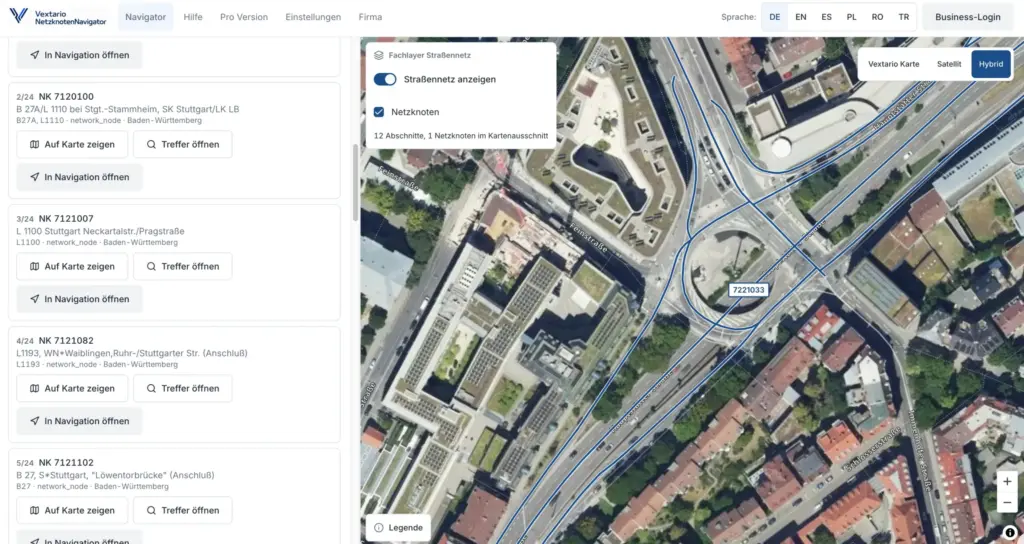
Product page: Vextario Netzknoten Navigator
https://netzknoten-navigator.vextario.com/
What do Netzknoten, zero point, section, and station actually mean?
These terms are related, but they do not describe the same network object.
A Netzknoten, or network node, represents a node area within the German road-network model, typically around a relevant connection between classified roads.
A complex network node can contain several zero points. Those zero points can define the actual beginning and end of sections and branches. A Netzknoten is therefore not necessarily identical to one single geometric point on the road.
A section connects defined network reference points and has an orientation.
A station describes a location along that section. In simplified terms, it indicates how far along the section the point lies from the section origin.
The Brandenburg road information system describes this ASB-based model explicitly: roads are divided into sections, sections have a stationing direction and are bounded by FROM and TO network nodes, while stationing progresses from the FROM side toward the TO side.
That is why a value such as “station 1.250” is not sufficient by itself. The section context is part of the location.
What do VNK and NNK mean in a result?
In German road terminology, VNK and NNK refer to the VON-Netzknoten and NACH-Netzknoten, essentially the FROM and TO network nodes associated with the oriented road section.
Stationing increases in the defined direction from the FROM side toward the TO side.
This distinction matters because the physical direction in which a vehicle is traveling is independent of the network’s stationing direction.
A field vehicle can drive through the same section in the opposite direction without changing the professional stationing model.
That becomes especially important on divided roads, interchange ramps, and complex nodes.
A common mistake in custom spreadsheets or simple GIS logic is to infer professional stationing direction from vehicle movement or line orientation alone. That may occasionally produce the expected answer, but the concepts are not equivalent.
Netzknoten Navigator therefore treats travel direction and stationing direction separately.
What is linear referencing and why is it useful for roads?
A conventional geographic coordinate describes where a point lies on the Earth’s surface.
A linear reference additionally or alternatively describes where that point lies along a line object.
In road information systems, that line object is typically a defined section or branch of the road network.
This approach is useful because a large amount of specialist road information naturally belongs to a position along a road.
A work zone may begin at one station and end at another. A bridge can be assigned to a station. Signs, road defects, inspections, or maintenance objects can also be referenced to a defined section.
OKSTRA uses this same principle for road-related objects. Objects associated with the road network can receive their network relationship through stationing on a section or branch.
Netzknoten Navigator turns that specialist concept into an operational workflow. The user does not need to perform linear-referencing calculations manually. The application accepts a map point, coordinate, or road reference and performs the appropriate resolution.
How does the application resolve GPS coordinates against the road network?
Forward resolution starts with a geographic position.
That position can come from the device’s GPS sensor, manually entered coordinates, or a point selected directly on the map.
The next step is determining which professional road-network objects correspond to that location.
A simplistic implementation could select the geometrically nearest road line.
That is insufficient around divided carriageways, ramps, branches, and complex junctions.
A specialist road resolver needs additional context.
Relevant factors can include road class and road number, section geometry, node relationships, network direction, the regional source model, and alternative candidates.
The result may therefore contain more than one plausible assignment.
That is a useful feature rather than a failure.
At a complex interchange, professional software should not report one road reference as certain merely because its line geometry happens to be slightly closer to the GPS point than another plausible carriageway.
How does reverse resolution convert stationing back into coordinates?
Reverse resolution begins with a professional network reference.
The input may contain a road, FROM and TO nodes, section, and stationing value. The desired output is a geographic position.
The application first identifies the relevant section or branch and its geometry.
It can then place the station along that geometry and translate the resulting location into geographic coordinates.
A linear road reference becomes a map point.
This is especially relevant to traffic control contractors because customer and authority documents often already use road-based references.
A specification may describe a work zone through a section and station. Reverse resolution converts that specialist notation into something that can be displayed on a map, shared with a crew, and handed to navigation.
The user does not need to understand how the section geometry is stored or how a position is interpolated along the underlying line.
Why does the product distinguish road sections from branches?
Not every professional road network can be represented as a simple chain of ordinary sections.
Complex network nodes can include additional connections, such as interchange ramps or internal connections between carriageways.
Road information models therefore also use branches to represent these relationships.
This matters during position resolution.
A GPS coordinate near an interchange may be geometrically closer to a ramp branch than to the through carriageway. If the software assumes that every location must belong to a conventional road section, the resulting network reference can be wrong even though the marker looks reasonable on the map.
Netzknoten Navigator therefore treats sections, branches, and complex network situations as professional objects rather than merely visual map lines.
The distinction is technical, but the operational result is straightforward: the application has more information available when it needs to determine which road object the user is actually working on.
How are WGS84 and ETRS89/UTM32 different?
WGS84 and ETRS89/UTM Zone 32 describe geographic positions in different ways.
WGS84, commonly represented by EPSG:4326, uses geographic longitude and latitude. Smartphones, GPS receivers, web maps, and many APIs operate naturally in this coordinate space.
ETRS89/UTM Zone 32N, EPSG:25832, is a projected coordinate reference system. Positions are described using easting and northing values measured in meters.
That projected form is convenient for many GIS, engineering, surveying, and planning processes because geometries are handled within a metric coordinate system.
Netzknoten Navigator therefore provides WGS84 decimal coordinates, degrees-minutes-seconds, and ETRS89/UTM32.
One technical point matters when data moves into other systems. German federal georeferencing rules describe UTM conventions for zones 31, 32, and 33, while EPSG:25832 specifically identifies UTM Zone 32N with east-north axis order.
An integration should therefore specify the actual CRS instead of saying only “UTM.”
What usually goes wrong when coordinates are transferred between systems?
One common problem is missing CRS metadata.
A CSV contains two large numbers, but several months later nobody can determine whether they represent longitude and latitude, easting and northing, or coordinates from an older German reference system.
Axis order is another recurring source of mistakes.
WGS84 coordinates are often encoded as longitude, latitude in technical formats, while people frequently say latitude first in normal conversation. Projected systems introduce easting and northing instead.
A third issue occurs when values are reformatted rather than properly transformed between different coordinate reference systems.
Netzknoten Navigator keeps coordinate representation and reference system associated with the same road position.
The benefit is not simply displaying additional numbers. The user needs to know what those numbers actually represent before copying them into the next workflow.
Which technical function supports which type of input?
| Starting point | Technical function | Professional result | Typical next step |
|---|---|---|---|
| GPS or WGS84 | Location resolver | road, section, nodes, stationing | project preparation, documentation |
| Map point | Spatial matching | possible network references | site review |
| Section plus station | Reverse resolver | geographic coordinate | map, navigation, field use |
| Network reference | Section geometry | road-section course | work-zone range, GIS |
| Coordinate | CRS transformation | WGS84, DMS, ETRS89/UTM32 | engineering and data exchange |
| Single position | Sharing | persistent link or QR code | supervisor, crew |
| CSV file | Batch resolver | many references or coordinates | framework contracts, inventories |
| Road result | GeoJSON export | geometry plus properties | GIS and mapping applications |
| Road result | OKSTRA export | specialist road objects | road-management software |
| External application | API | structured network context | portal, GIS, mobile app |
| Assistant system | MCP | callable road-network tools | assisted specialist workflows |
Why are source, data vintage, and confidence technical features?
Professional road information does not originate from one static nationwide database.
Regional authorities maintain and update different data sets. Available attributes and update cycles can vary.
A professional result therefore should not consist only of a stationing value.
Netzknoten Navigator can retain the source used for the resolution, the data vintage of that source, and information about how confidently the geographic location could be associated with the road network.
Confidence should not be understood as a guarantee of professional correctness. It describes the quality or certainty of the automated assignment.
Ambiguity is equally important.
When several network objects are plausible, that state should remain visible rather than being silently converted into one supposedly definitive result.
A data gap is another valid outcome. If the underlying source does not contain the required professional attribute, the system should not invent one.
These distinctions are what separate a specialist road resolver from a simple nearest-line query.
What does a regional capability mean?
Not every German state exposes exactly the same road attributes through the same source structure.
A nationwide product therefore benefits from explicitly describing which functions are available in each data region.
A capability can indicate whether stationing can be resolved, whether operating kilometers are available, whether structure data exists, or whether a particular specialist export is supported.
This sounds like an implementation detail, but it solves an important operational problem.
The user or connected application can distinguish between “the product does not support this function” and “the regional source data does not provide the required information.”
Capabilities also improve automation.
An API consumer can inspect the available functions before starting a batch or attempting a transformation that cannot be supported in the selected data region.
Why should a shared result preserve its original data vintage?
Road networks change.
A new roundabout can create a new network node. A section can be split. Roads can be reclassified. Geometry can be corrected.
If a project link created today were automatically recalculated against a future road-network version whenever somebody opened it, its professional reference could change without warning.
That would be problematic for documentation.
A robust road-location workflow therefore benefits from preserving the data vintage associated with a stored or shared result.
A user can later determine which network state produced the original assignment.
Newer data can still be available for a new lookup. The important point is that an updated data set should not silently rewrite the historical meaning of an existing project reference.
How does CSV batch processing work technically?
Interactive search handles one location at a time.
Batch processing has different requirements.
A CSV file may contain hundreds or thousands of rows. Column names can differ between customers. Some coordinates can be missing or malformed. Some locations resolve perfectly, while others remain ambiguous.
The first requirement is therefore column mapping.
The import process needs to know which field contains latitude, longitude, stationing, road number, or another required input.
Each row can then be processed independently.
That row-level model is important for error isolation.
One invalid coordinate should not cause every correctly formatted row in the file to be discarded.
Successful results, ambiguous assignments, and technical failures can be reported separately.
For operational data processing, this is considerably more robust than an all-or-nothing import model.
Why are CSV and GeoJSON separate export options?
CSV and GeoJSON solve different problems.
CSV is tabular. It works naturally with Excel, databases, reporting tools, business intelligence, and many traditional specialist systems.
GeoJSON is a geospatial interchange format.
RFC 7946 defines geographic geometries, features, and feature collections and includes seven concrete geometry types, including Point, LineString, Polygon, their Multi variants, and GeometryCollection.
For Netzknoten Navigator, a resolved work site can therefore be represented as a point feature with professional road attributes. A road section can be represented using line geometry for further GIS processing.
RFC 7946 uses WGS84 geographic coordinates in decimal degrees. This matters technically when exporting data and is one reason a GeoJSON file should not simply be assumed to contain arbitrary projected UTM coordinates.
Why does the product also need OKSTRA?
GeoJSON is excellent for general geospatial interchange, but it does not define German road-domain semantics.
It knows what a point or line is. It does not inherently know what a German Netzknoten, road point, or other specialist road object means.
OKSTRA, the German Object Catalog for Roads and Transportation, addresses that domain.
It defines a specialist data model for exchanging road and transport information, including relationships between domain objects rather than geometry alone.
The currently published OKSTRA release is version 2.023, adopted on May 27, 2026.
For suitable data environments, Netzknoten Navigator supports an OKSTRA-oriented export workflow. XSD validation can verify that generated XML conforms structurally to the intended schema.
This is more specialized than downloading CSV, but it enables interoperability with genuine road-management workflows.
What does provenance mean in an export?
Provenance answers a simple question: where did this value come from?
For a road reference, provenance can include the source data set, its data vintage, the resolution method, and whether the assignment was unique or ambiguous.
Those details should not necessarily disappear when data leaves the application.
A CSV export can carry status and source columns. A GeoJSON feature can include the same information as properties. An API response can provide provenance as structured fields.
This becomes particularly important when data sets are combined later.
A coordinate without context may look complete, but investigating a discrepancy months later is much easier when the original source and assignment status traveled with the record.
How is the Road Network Intelligence API intended to work?
The web application is one user interface on top of the professional road-location logic.
Companies with their own systems also need programmatic access.
A Road Network Intelligence API can expose operations that resolve a coordinate into a network reference, translate stationing back into a geographic point, retrieve network context, or inspect regional capabilities.
Versioning is important.
Internal algorithms and data structures can evolve without unexpectedly breaking existing integrations when the external API contract remains controlled.
Capability queries are useful for the same reason.
A connected application can determine whether a specialist function is available in the relevant data region before attempting to use it.
For a mid-sized traffic control contractor, this turns Netzknoten Navigator from an isolated website into a reusable specialist service for dispatch, customer portals, inspection workflows, GIS, or mobile applications.
What is MCP and why does it belong in a road-referencing product?
MCP stands for Model Context Protocol.
In practical terms, compatible assistant systems can use it to call defined tools with structured inputs and outputs.
For Netzknoten Navigator, that means an assistant does not have to guess which network node belongs to a coordinate.
It can call a specialist operation such as find_net_node, find_road_segment, resolve_location, resolve_stationing, or get_network_context.
MCP itself evolved significantly during 2026. The specification published on July 28, 2026 introduced a stateless protocol core for HTTP-based requests.
For Vextario, however, the more important principle is architectural: the professional calculation remains inside the Road Network engine. The language model only invokes that capability.
Why should an AI assistant not determine stationing on its own?
Because professional road referencing is not fundamentally a language task.
A language model can explain what stationing means. It should not invent a station or network node from general geographic knowledge.
The actual result needs to come from appropriate road data and a deterministic or otherwise inspectable specialist resolver.
MCP keeps those responsibilities separate.
The assistant can understand the user’s request, such as “Which road reference belongs to this work-zone coordinate?”
The specialist Netzknoten function then performs the geospatial calculation.
That distinction is particularly important for operational and safety-adjacent workflows. Natural-language interaction can simplify access to the data, but it should not replace the underlying specialist data model.
Which technical mistakes should a professional road resolver avoid?
Several failure modes recur in real systems.
The closest geometry is automatically assumed to be the correct road section. Travel direction is confused with stationing direction. Coordinates are exported without a CRS identifier. Latitude and longitude are swapped. Missing specialist attributes are filled with plausible-looking guesses. One bad CSV row aborts an entire batch. Updated road data silently changes historic project references.
Netzknoten Navigator is designed around avoiding those patterns.
Ambiguities can remain explicit. Missing information remains missing. Provenance travels with the result. Batch failures are isolated per row. Regional functionality is represented through capabilities. Historical results can retain their original data context.
These features are less visible than a map animation.
For professional software, they are often far more important.
How does all this technical detail fit a mid-sized contractor’s daily work?
Most users should not need to think about EPSG codes or linear-reference algorithms while preparing a work zone.
That complexity belongs under the workflow.
The supervisor selects a point and receives the professional road reference. Project preparation enters a section and station and receives a map location. A crew scans a QR code and starts navigation. A data manager later processes hundreds of sites through CSV. An internal system uses the same logic through the API.
The specialist model supports all of these tasks without requiring every employee to become a GIS expert.
That is particularly useful for mid-sized contractors.
Technical sophistication should reduce operational effort, not move GIS complexity onto every user’s desk.
Additional specialist tools for traffic control and road operations are available through the Vextario traffic control product family:
Why is Netzknoten Navigator technically more than a network-node search?
Because the network node is only one object in the underlying model.
The real problem is translating reliably between the physical location, geographic coordinates, and the professional road network.
That requires geometry, stationing, direction, regional data models, coordinate reference systems, and data vintage to work together. Professional use then adds batch processing, standardized exports, and system interfaces.
The result is closer to a Road Location engine than to a simple search page.
The same professional logic can be used on a map, on a smartphone, in CSV processing, inside GIS, through an API, or from an MCP-compatible assistant.
Product page: Vextario Netzknoten Navigator
https://netzknoten-navigator.vextario.com/
Manufacturer: KrambergAI GmbH
https://krambergai.com/
Sources for the statistics used
German Federal Agency for Cartography and Geodesy: Technical georeferencing rules
Statistic used: German federal rules describe UTM conventions for zones 31, 32, and 33.
https://www.bkg.bund.de/SharedDocs/Downloads/BKG/DE/Downloads-Allgemein/TR-BGeoRG.pdf
RFC Editor / IETF: RFC 7946, The GeoJSON Format
Statistic used: GeoJSON defines seven concrete geometry types.
https://www.rfc-editor.org/info/rfc7946/
OKSTRA: Current German road and transportation object-catalog release
Statistic used: current release 2.023, adopted May 27, 2026.
https://www.okstra.de/schema.html
Further reading
Brandenburg State Road Authority: Brandenburg Road Information Database
Detailed official explanation of network nodes, sections, stationing direction, and the ASB-based road-reference model.
https://www.ls.brandenburg.de/ls/de/service/strasseninformationsbank-brandenburg/
GovData: Classified Road Network of Saxony
Official description of network nodes, zero points, sections, stationing, and available specialist exchange formats.
https://www.govdata.de/suche/daten/gdi-sbv-klassifiziertes-strassennetz-sachsen-dsf3611
Model Context Protocol: 2026-07-28 Specification
Technical background on the protocol through which specialist road-network functions can be exposed to compatible assistant systems.
https://blog.modelcontextprotocol.io/posts/2026-07-28/
What is the difference between a Netzknoten and a zero point?
A Netzknoten represents a node area in the road network, typically around a connection between classified roads. A complex node can contain several zero points. Zero points provide the actual start and end references for sections or branches. For technically exact road referencing, the Netzknoten number alone may therefore be insufficient in more complex network configurations.
What does stationing mean within a road section?
Stationing describes the location of a point along a defined road section. It is measured from the section origin in the defined stationing direction. A value such as 1.250 therefore does not simply mean kilometer 1.250 of the entire road. The corresponding section or network reference is required to interpret the location professionally.
How is stationing direction different from travel direction?
Stationing direction belongs to the professional orientation of the road section and runs from its FROM reference toward its TO reference. Travel direction describes the actual direction in which a vehicle is moving. A vehicle can travel against the stationing direction, so the two concepts must remain separate, particularly around divided carriageways, ramps, and complex interchanges.
Why does the application use EPSG codes?
An EPSG code identifies a coordinate reference system unambiguously. It therefore indicates whether two numeric values represent geographic WGS84 coordinates or projected ETRS89/UTM values. Netzknoten Navigator supports EPSG:4326 for geographic WGS84 coordinates and EPSG:25832 for ETRS89/UTM Zone 32N, helping integrations specify exactly how coordinate values should be interpreted.
What does confidence mean for a road-network result?
Confidence describes how strongly the resolution logic supports a particular assignment. It is not a guarantee of professional correctness. Around ramps, complex junctions, or parallel carriageways, several road objects may be plausible. Netzknoten Navigator can therefore expose ambiguity separately instead of presenting a single result as certain merely because it received the highest automated score.
What is a regional capability?
A capability describes which specialist functions are actually supported for a particular regional data environment. Stationing may be available while operating kilometers or certain structure information are not. This avoids pretending that every German state provides identical data and also allows connected systems to inspect available functionality before running transformations or larger automated jobs.
How are CSV and GeoJSON different as export formats?
CSV is tabular and works well with spreadsheets, databases, business intelligence, and traditional specialist systems. GeoJSON stores geometry and properties in a standardized JSON structure and therefore integrates naturally with GIS and web-mapping software. Netzknoten Navigator can use either approach depending on whether the target workflow primarily requires business data or directly usable geographic features.
Why is an OKSTRA export useful in addition to GeoJSON?
OKSTRA is a German specialist model for road and transportation information. Unlike a general geospatial format, it can represent road-domain object types and their relationships in a standardized way. For suitable data environments, an OKSTRA export can therefore integrate with specialist road systems, while schema validation can check whether the generated XML structure conforms to the intended model.
How does batch processing prevent one bad row from stopping everything?
Each imported row can be treated as an independent processing unit. Successful resolutions, professional ambiguities, and technical failures can be reported separately. A file containing hundreds of work locations therefore does not have to be discarded because a small number of coordinates are missing, malformed, or cannot be assigned uniquely to a professional road-network object.
Why does the product offer MCP in addition to a conventional API?
The API primarily supports conventional software integrations. MCP allows compatible assistant systems to invoke the same specialist capabilities as defined tools. A language model therefore does not need to determine a road reference itself. It can call an operation such as resolve_location while the actual geospatial calculation remains inside the specialized Road Network engine.